Version Control with Git
Git is a distributed version control system that allows developers to track changes in their code, collaborate with others, and maintain a detailed history of their projects. This guide covers the basics of Git, its core commands, and best practices for effective version control.
What is Git?
- Definition: Git is a tool for tracking changes in source code during software development.
- Key Features: Distributed architecture, branching, merging, and a robust history of changes.
Basic Git Commands
-
Initialization:
git initInitializes a new Git repository.
-
Cloning:
git clone [repository URL]Clones an existing repository from a remote server.
-
Staging and Committing:
git add .
git commit -m "Commit message"
Stages changes and commits them to the repository.
-
Viewing Status and History:
git status
git log
Branching and Merging
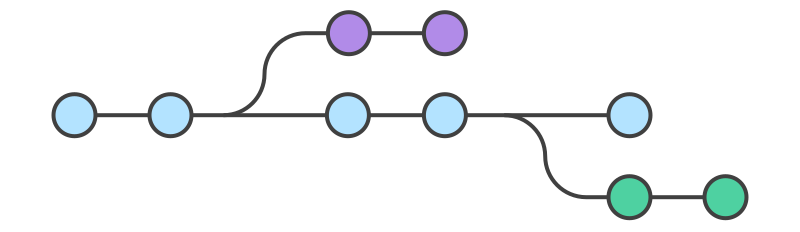
- Creating a Branch:
git branch feature-branch - Switching Branches:
git checkout feature-branch - Merging Branches:
git merge feature-branch
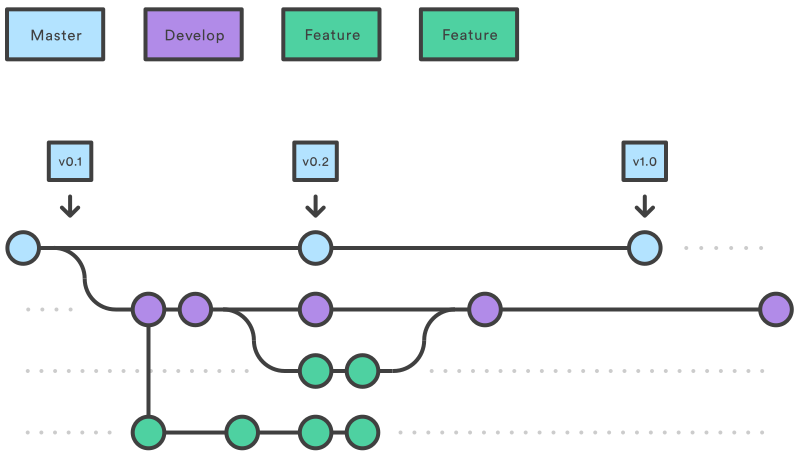
Collaborative Workflows
.svg)
- Remote Repositories: Use platforms like GitHub, GitLab, or Bitbucket.
- Pull Requests: Facilitate code reviews and collaboration.
- Rebasing:
Helps keep a clean commit history.
git rebase main
Best Practices
- Write clear, descriptive commit messages.
- Commit small, incremental changes.
- Regularly synchronize your local repository with remote changes.